If the Gateway tunnel is disconnected, how can i verify the status of a pod?
Step 1: Check the pod status
Use the following command to verify whether NextGen Gateway pod (nextgen-gw-0) is running or not.
kubectl get pods
Step 2: If the pod is running and the Gateway tunnel is disconnected
- To ensure that the Gateway tunnel is properly established to the cloud, use the following command to verify the vprobe container logs.
Example:kubectl logs nextgen-gw-0 -c vprobe --tail=200 | grep TlsMonComm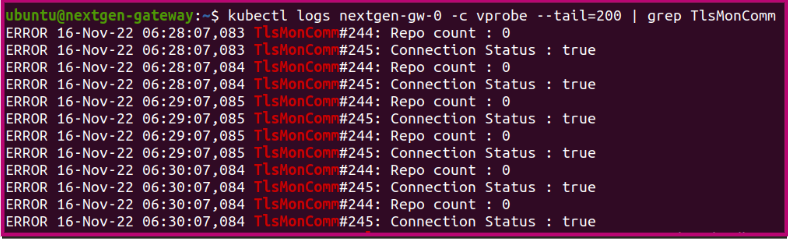
- Make sure that the connection status is True. If the connection is False, use the following command to check the complete vprobe logs for additional information.
kubectl logs nextgen-gw-0 -c vprobe -f
Step 3: If the POD status is other than Running
- If you see POD status other than Running, then you must debug the pod. Use the following command to check the current status of the POD.
Example:kubectl describe pod ${POD_NAME}ubuntu@nextgen-gateway:~$ kubectl describe pod nextgen-gw-0 Name: nextgen-gw-0 Namespace: default Priority: 0 Node: nextgen-gateway/10.248.157.185 Start Time: Fri, 28 Oct 2022 16:57:45 +0530 Labels: app=nextgen-gw controller-revision-hash=nextgen-gw-6744bddc6f statefulset.kubernetes.io/pod-name=nextgen-gw-0 Annotations: <none> Status: Running IP: 10.42.0.60 IPs: IP: 10.42.0.60 Controlled By: StatefulSet/nextgen-gw
Note
- If a pod is stuck in the Pending state, it cannot be scheduled onto a node. This is generally due to insufficient resources of one type or another, which prevents scheduling. The scheduler should provide messages explaining why it is unable to schedule your pod.
- If a pod is stuck in the ErrImagePull state, Kubernetes attempted to pull the container image but the pull failed. This is usually due to an incorrect image name or tag, a missing image in the registry, lack of permission to access a private registry (missing or invalid imagePullSecrets), registry connectivity or DNS issues, TLS or certificate problems, or registry rate-limiting. The kubelet will provide events explaining the exact pull failure.
- If a pod is stuck in the ImagePullBackOff state, Kubernetes has repeatedly failed to pull the container image and is now backing off before retrying. This generally indicates the same root causes as ErrImagePull, but with multiple failures causing exponential retry delays. The kubelet events will provide the specific error (for example, not found, unauthorized, I/O timeout, or x509 errors).